Free assessment
Install the app

Put Roshni Clinic on your home screen

Add our site to your phone or computer in a few taps. It opens full screen with its own icon, just like an app, and there is nothing to download from an app store.

One tap awayStraight from your home screen
Full screenOpens like an app
Nothing to downloadNo app store needed
Knows when you're offlineAnd picks up when you're back

iPhone and iPad

in Safari

  1. Open this site in Safari.

  2. Tap Share. On an iPhone it is at the bottom of the screen, on an iPad at the top. On newer iPhones, tap ••• first, then Share.

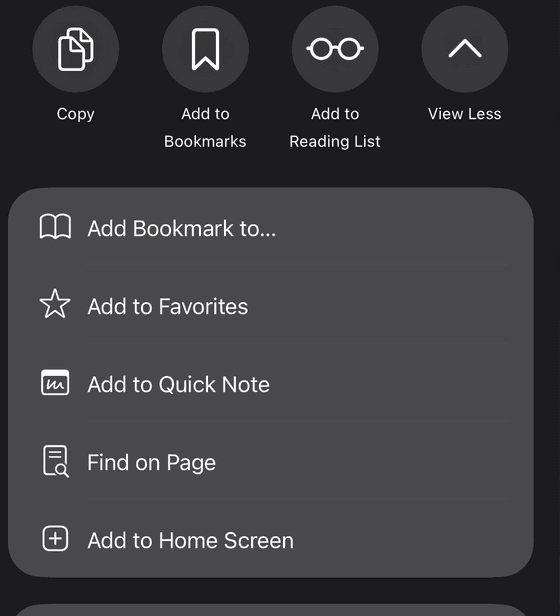
  3. Tap View More if the list is short, then tap Add to Home Screen.

  4. Leave Open as Web App switched on if you see it, then tap Add.
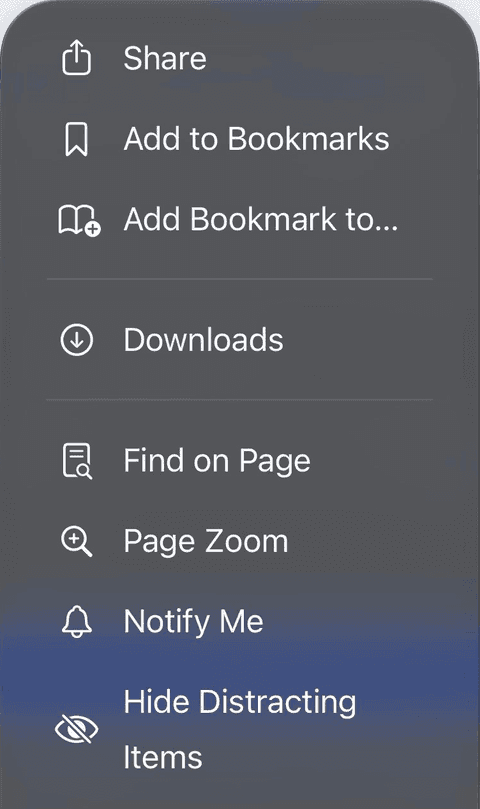
Safari's ••• menu on an iPhone, with Share at the top of the list.
Tap •••, then Share.
Safari's Share sheet on an iPhone, with Add to Home Screen at the bottom of the list.
Then Add to Home Screen.

The icon appears on your home screen. Open it from there and the site fills the screen, without Safari's bars.
Android

in Chrome

  1. Open this site in Chrome.

  2. If you see an Install app button at the foot of the page, tap it and you are done.

  3. Otherwise tap Menu at the top right.

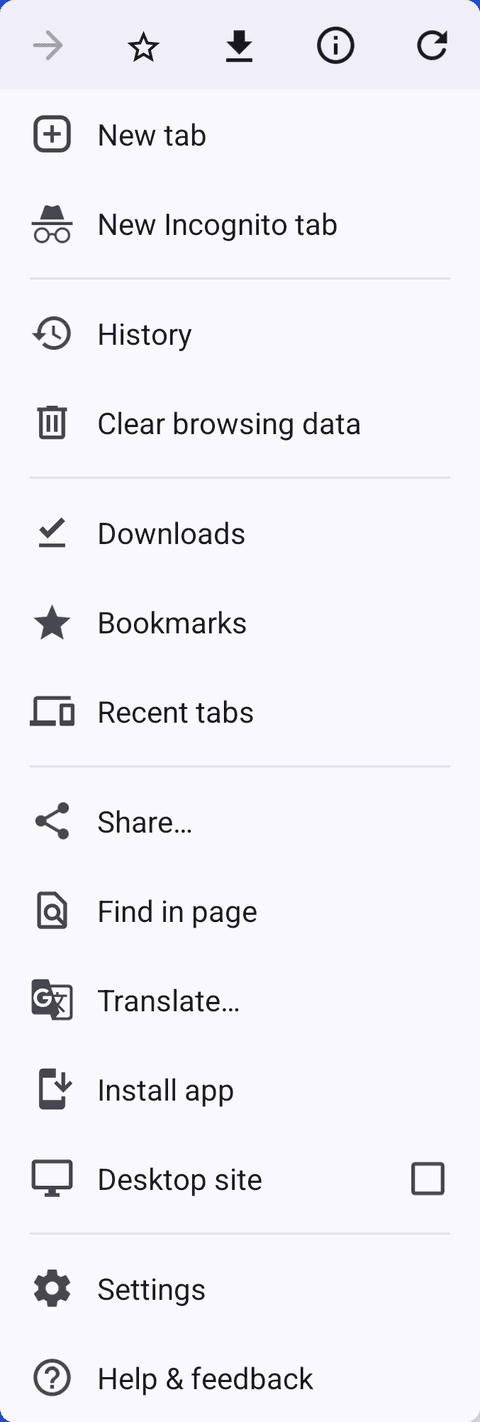
  4. Tap Install app (on some phones Add to home screen), then Install.

Chrome's menu on an Android phone, with Install app near the bottom of the list.
Tap the menu, then Install app.

Once installed it sits with your other apps and on your home screen.

Samsung phones

in Samsung Internet

  1. Open this site in Samsung Internet.

  2. If an Install icon shows in the address bar, tap it.

  3. Otherwise tap Menu at the bottom right.

  4. Tap Add page to, then Home screen (on some versions, Add to Home screen directly).

Computer

in Chrome or Edge

  1. Open this site in Chrome or Microsoft Edge.

  2. Click the Install icon at the right of the address bar.

  3. No icon? In Chrome open Menu, then Cast, save and share, then Install page as app. In Edge open •••, then Apps, then Install this site as an app.

  4. Click Install. It opens in its own window and can be pinned to your taskbar or Dock.

Common problems

Not working?

I opened the link from WhatsApp, Instagram, Facebook or TikTok and there is no option
Those apps open links in their own built-in browser, which cannot install anything. Open the page in your phone's real browser first: tap the ••• or Open button in the corner and choose Open in Safari (iPhone) or Open in Chrome / Open in browser (Android). Then follow the steps above.
I'm on an iPhone using Chrome, Firefox or Edge
On recent iOS versions these browsers have Add to Home Screen in their own Share menu. If yours does not, copy the address, open it in Safari and follow the iPhone steps. Safari is the most reliable way on an iPhone or iPad.
Chrome on Android shows no Install option
Make sure you are not in an Incognito tab, and that Chrome is up to date (Play Store, then Chrome, then Update). Some versions call it Add to home screen rather than Install. If the menu says Open app, it is already installed.
I installed it but can't find it
On Android, look in the app drawer (swipe up from the home screen) and drag it to your home screen. On an iPhone, swipe left to the App Library or search for the name. On a computer it is in the Start menu or Applications folder.
How do I remove it?
Press and hold the icon, then choose Remove App (iPhone) or Uninstall (Android). On a computer, open the app, then its Menu and Uninstall. The website itself works just as before.